
iCalendar & Outlook
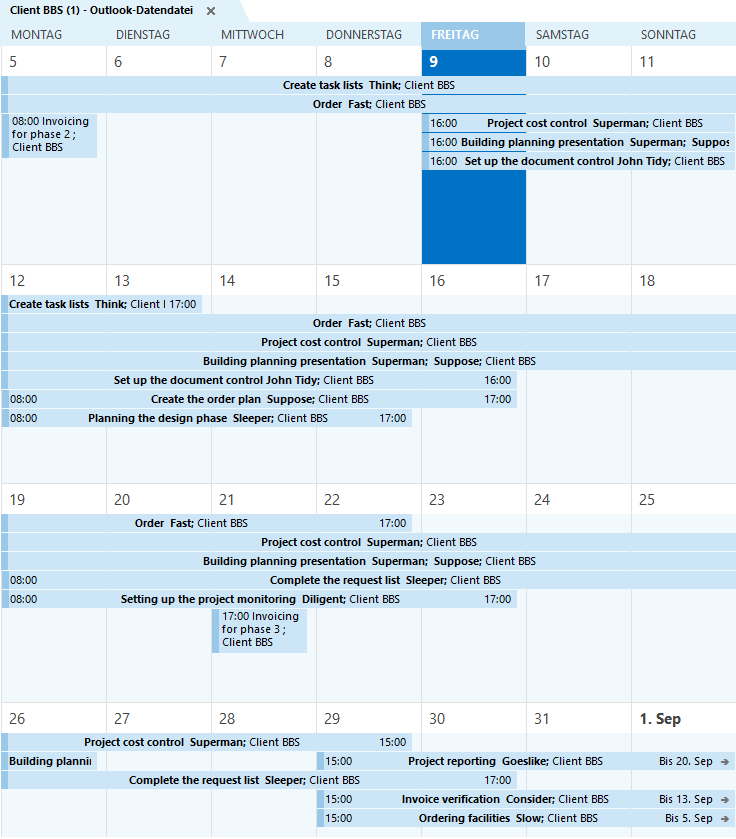
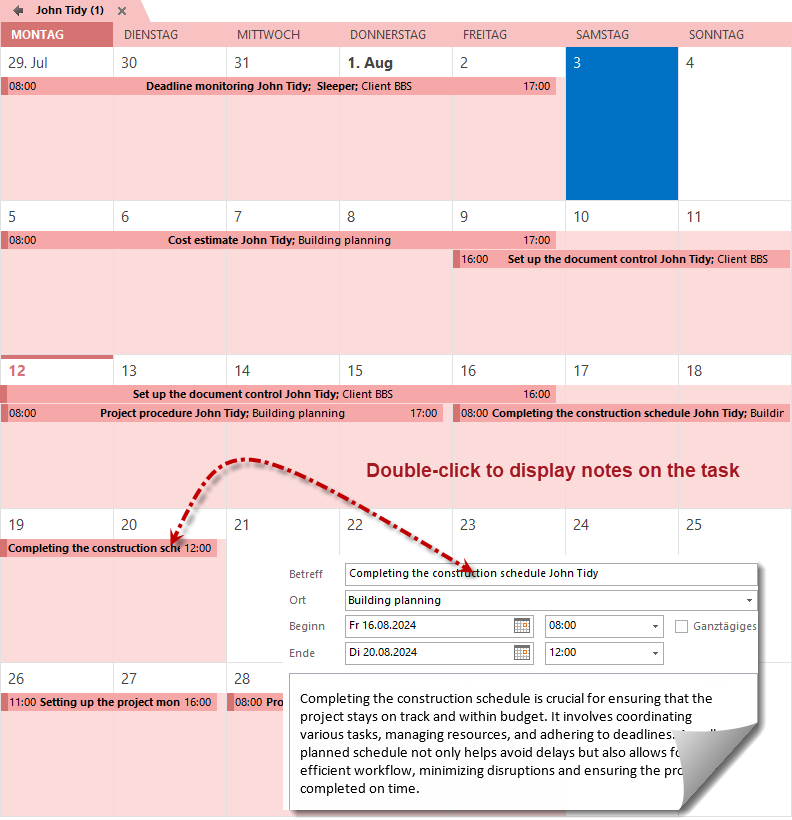
The iCalendar module (Rillsoft Project with interface to the Integration Server) is based on the open iCalendar standard and provides the scheduled tasks as .ics calendars. This way, project appointments can be transferred to other programs that support .ics files, such as Google Calendar, MS Outlook, Apple iCal, Mozilla Sunbird or IBM Lotus Notes.
The decisive advantage: the iCalendar module provides an up-to-date state of the scheduled tasks each time it is accessed. The calendar is subscribed, not imported once – schedule changes from Rillsoft planning therefore appear automatically in the personal calendar, without manual updating.
Five calendar types for every view
The module provides five different calendars, each tailored to a different perspective:
| Calendar type | Content |
|---|---|
| User calendar | All tasks of a user across projects per client |
| Subordinate user calendar | Tasks of the users subordinate in the administration organization chart, across projects |
| Client calendar | All tasks of a client across all projects |
| Portfolio calendar | All tasks of a project portfolio |
| Project calendar | All tasks of a single project |
From the individual employee through the manager to the client-wide overall view, every role thus receives exactly the calendar that maps its area of responsibility.
Personal calendar and team view
- The user calendar bundles all tasks of an employee across all projects of a client – the personal “what is coming up for me?” view directly in Outlook or Google Calendar.
- The subordinate user calendar shows a manager the tasks of their team from the administration organization chart, without having to open each project individually.
Overarching schedule and workload view
For the controlling level, three further calendars provide the big picture:
- Project calendar – all appointments of a project, ideal for project management and the teams involved
- Portfolio calendar – all tasks of a project portfolio, for programme management and PMO
- Client calendar – all tasks of a client across all projects
This allows deadlines and workload to be tracked outside Rillsoft too – in the familiar calendar program.
How it works: subscribe instead of import
Because the module is based on the iCalendar standard, the calendar is included as a subscription. With every access Rillsoft delivers the current planning state:
- New or shifted tasks appear automatically
- No manual re-importing of
.icsfiles - Identical data in all programs that subscribe to the calendar
Requirements and settings
Access to the iCalendar calendars is secured and configurable:
| Aspect | Details |
|---|---|
| User role | The user needs the iCalendar user role |
| Access key | An API access key is generated per user |
| Template/details | The client administrator defines through the client properties which appointment details are output |
Which information an appointment contains – visible for example on double-click of an appointment in the Outlook view – is thus determined by the client-wide configuration.
iCalendar software functions at a glance
- Provision of project tasks as .ics calendars following the iCalendar standard
- Five calendar types: user, subordinate user, client, portfolio, project
- Always up to date – the current planning state on every access
- Compatible with Outlook, Google Calendar, Apple Calendar, Mozilla Sunbird, IBM Lotus Notes
- Cross-project personal and team view
- Secured access via iCalendar user role and API access key per user
- Client-wide configuration of appointment details through the client properties
- Available with Rillsoft Integration Server (on-premise) or Rillsoft Cloud (hosted)
iCalendar within the Rillsoft platform
The iCalendar module is part of the server-based multi-user architecture of Rillsoft. It uses the same administration organization chart as e-mail notification and shares the central database with timesheet and document management. Together with capacity planning and multi-project management it makes project appointments available where employees already work – in their own calendar, always up to date.