
An AI assistant can help you find suitable employees for open project roles, review a reasoned proposal and apply confirmed assignments in Rillsoft Project. Project resource allocation means assigning people to tasks that carry roles. You make the staffing decision; Rillsoft Project calculates dates, demand and workload.
For resource managers in engineering and industrial teams, this is useful when many tasks have been planned with roles before people are named. “AI agents” here means external clients working through the local MCP server. It does not describe a new multi-agent feature, autonomous hiring or a learning-based optimisation product.
What does the verified before-and-after example show?
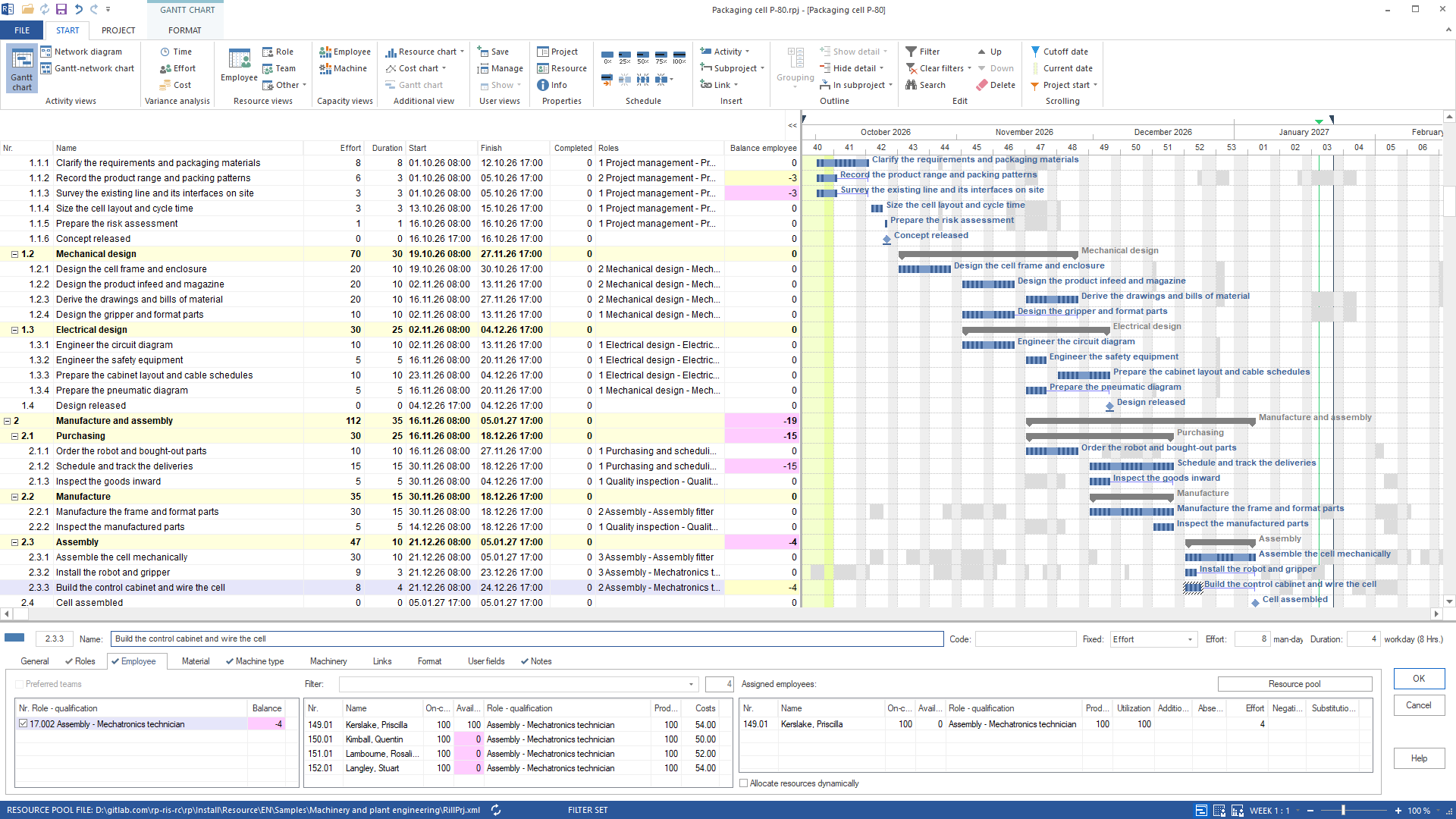
The synthetic “Packaging cell P-80” project in the Machinery and plant engineering package starts with 26 tasks carrying open roles. In the documented run on 29 September 2026 with Rillsoft Project build 10.0.624, the “Assign staff” wizard fills 34 places across 24 tasks. Four tasks retain open or partly filled employee roles. The subsequent check reports no employee overload.
| Checkpoint | Evidenced result |
|---|---|
| Before | 26 tasks with open roles |
| Applied assignments | 34 employee assignments across 24 tasks |
| Remaining employee gaps | four tasks open or partly staffed |
| Employee overload after the change | none reported in this run |
| Other unfilled demand | three equipment demands, which employee assignment does not resolve |
These figures describe one example build, not an outcome promised for your projects. The verified staffing workflow on rillsoft.ai provides the source and technical tools.
1. Identify the open roles and tasks
Open the project or relevant portfolio and check its task roles. The resource pool must include suitable people, qualifications and working calendars. Start with a copy or the synthetic sample data. Connecting an assistant does not repair missing planning inputs.
2. Find candidates with capacity evidence
Candidate search uses qualifications, availability, free capacity, costs and schedule conflicts from the plan. Having the right role does not mean a person is free in the required period. Ask for reasons per task and an explicit list of roles that cannot be filled, rather than just a list of names.
Read-only mode is sufficient for this inspection; the relevant candidate-list license is still required. The available-resources example also shows a case where none of the people in the pool can close the gap. That is a separate sample, so its figures should not be combined with the P-80 results.
3. Review and confirm the proposal
Check each candidate’s qualifications, time window, free capacity and conflicts against your team’s real commitments and priorities. In this workflow, the client is instructed to wait for your confirmation before assigning anyone. That instruction is not a guarantee of a server-side confirmation dialog before every mutating call.
4. Apply the staffing decision
Assignments require write access and the licensed staffing capability. The wizard considers open roles, schedule conflicts and full availability. Assigning a specific person is also possible, but remains a separate, deliberate planning decision. The assistant operates the existing Rillsoft scheduling engine; it does not introduce its own scheduling calculation.
5. Inspect the remaining gaps
- On 1 October, four project engineers are needed at the same time, while two are fully available. Two early tasks remain open or partly staffed.
- For “Schedule and track the deliveries”, the two technical buyers are available at only 80 and 40 percent. The automatic wizard does not use a partially available person to fill that demand.
- On 21 December, five places for mechatronics technicians compete for four people. “Build the control cabinet and wire the cell” remains partly staffed.
Read the candidate and conflict lists again after writing. The example’s unassigned-resource list also contains three equipment demands. Its seven entries therefore do not mean seven unfilled employee tasks. Decide whether to reschedule, add capacity or make a different explicitly reviewed assignment.
6. Undo a change when necessary
Each mutating MCP call creates its own undo step. The single staffing call can be undone with Ctrl+Z; a sequence of changes requires the corresponding sequence of undo steps. Check the plan again afterwards. Read-only mode rejects changes. The developer guide leads to the technical contract and error handling.
What limits should a resource manager keep in view?
Cross-project conflicts cover the open portfolio. Assignments in unopened projects are not included. These proposals do not learn from past personnel decisions. A local MCP server also does not mean every AI client processes data locally: the server binds to 127.0.0.1 inside Rillsoft Project, while the client may transmit data to its provider. An MCP call carries no separate user identity.
Editorial responsibility: Rillsoft. Content reviewed 19 October 2026; reused DE/EN example evidence dated 29 September 2026, build 10.0.624. The sample and screenshot use synthetic data.
Try the workflow with Rillsoft Project · Local MCP server requirements · Resource planning versus task management